Showing posts with label SEO Tricks. Show all posts

Wednesday, February 12, 2014

Use Multiple Internet Connections Simultaneously

Got multiple connections? Wanna join multiple internet connections on single computer? Check out my tutorial about how to utilize multiple internet connections at once to get faster bandwidth and speed. In this tutorial i will help you about how to mix up your internet connections at single pc that will add up the bandwidth of all the internet connections and give you an output of the sum of all the bandwidths. To increase your internet speed by using multiple internet connections, Follow the simple steps below.
NOTE: You can join all type of internet connections at once like 3G,4G, WLAN or Ethernet internet connections.
Multiple internet connection
Connectify Dispatch Pro
  • First of all, you need to be using Windows 7 (SP1) or above, then download a program named “Connectify Dispatch Pro”.
  • You can download this program by Clicking the link Below.
  • Click Here to Download “Connectify Dispatch Pro”.
  • Install the program, and then Run this program.
  • Now connect all your internet connections (3G,4G,WLAN or Ethernet) to your system.
  • Once you connected your internet connections then Click on on ‘Start Dispatch’ button.
utilize multiple internet connections
When Single Adapter Connected
This will integrate all you internet connections and give you the output as the sum of all the internet bandwidth. You can see the following screenshot that i taken by myself.
Boost internet speed
When two adapters start working together

When you connect two internet connection and Dispatch them then you can see the third Black output line as shown below.
join two internet connections on one pc
Output bandwidth

Try this and get amazing combined internet speed. Don't forget to tell your friends about this post. Share it

Read More

Tuesday, February 11, 2014

Monetize Videos on Youtube to Earn Money

If you want to earn money from google adsense without any blog or website you can earn money from youtube with uploading your videos on youtube and monetize them with youtube monetization program.
Friends in this post i will tell you how to monetize your videos with youtube monetization program. To monetize your videos you will have to apply for youtube monetization program and get a Google Adsense account.


When you have your adsense account after getting approved for monetization program. Follow these steps

1: Sign in to your youtube account.

2: Click on Upload Video

3: Upload a video

(Note: Never use any copyright video to monetize. Videos like movie trailers, songs or any other copyright material is not allowed for monetization by youtube.)

5: Chose your video title,  description, tags and thumbnail.
google adsense tutoria

6: wait till your video uploaded successfully.

7: Now Click on Monetization Tab right next to Basic Infos.

8: Click on Monetize with ads, Ads format and Syndication.
Monetize your videos on youtube

9: Click Save

Now your video is applied for monetization and will get approval within 24 hours.  Some times it takes only 10 to 15 minutes, some times it takes up to 24 hours.
how to monetize videos on youtube


Don’t forget to share my post with your friends if you think its helpful. If you have any questions don’t hesitate to ask. Just comment and ask I will solve your issues.

Read More

Monday, February 10, 2014

Quickly Approved Google Adsense Account

This Post is specially created for the visitors from Pakistan, India and China. Due to some reasons google adsense is not offering its accounts easily to publishers from these areas. Main reason is scrap content. Which means there is not enough quality content on websites and blogs from these areas. Google is a world best platform for online advertising so google try its best to provide 100% quality platforms to its customers (advertisers) to advertise their products. That is why google adsense is not issuing account to these areas easily.
In This post i will tell you guys to apply and get approved for adsense in 24 hours. This is a hidden secret to get a google adsense account in 24 hours. just follow the instructions given below and apply for an adsense account and get approved within 24 hours. But always remember try this method only if you think you can maintain google standards and provide quality niche and content.
Follow these steps. Note: All steps are compulsory.

1- Creat a google account. You can create google account while sign up to gmail.

2- Go to Youtube.com and sign in with your google account.
(When you sign in to youtube with your google account. it means you have created a youtube channel where you can upload videos)

3- Upload up to 5 videos
(Only upload videos that are not copyright content. Means you should upload only those videos that are created by you, your friends or any family member. For example you shoot a video of your friend while flying kite etc.)

4- Verify your Youtube Channel.
(When you verify your Youtube channel it It allows you to upload unlimited video size, time and files)
To Verify Your Youtube Channel Read These instructions.

(i)  Go to your Video Manager than Click on Channel Settings > Features


(ii) Select your country, Select verification method than enter your Cell no
Get adsense account quickly

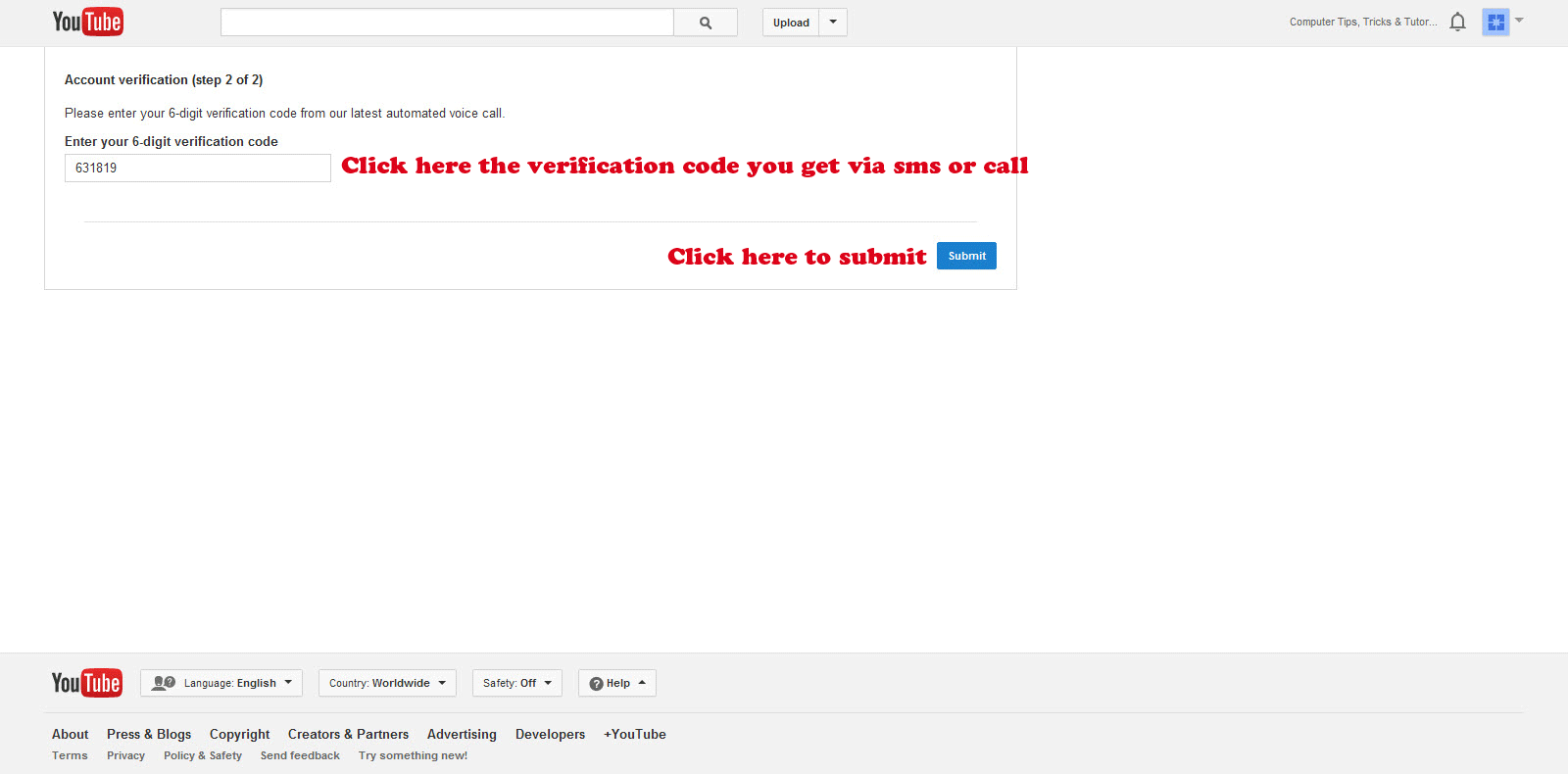
(iii) You will receive a verification code via sms or call. Enter that code and submit
get google adsese account easily

Now that your youtube channel is verified you can upload unlimited videos. Now move on to next step to apply for youtube monetization program.

Youtube Monetization Program or Youtube Partnership:

Youtube pays you money to upload videos. When you upload videos to youtube they allows you to show their ads in your videos. When some one views your monetized video they will shown ads by youtube. If anyone click on those ads you will be paid by youtube. Wait a minute, where that money is going? that money is going to a Google Adsense Account.

Apply to Youtube Monetization Program:

To apply for youtube monetization program follow these instructions.
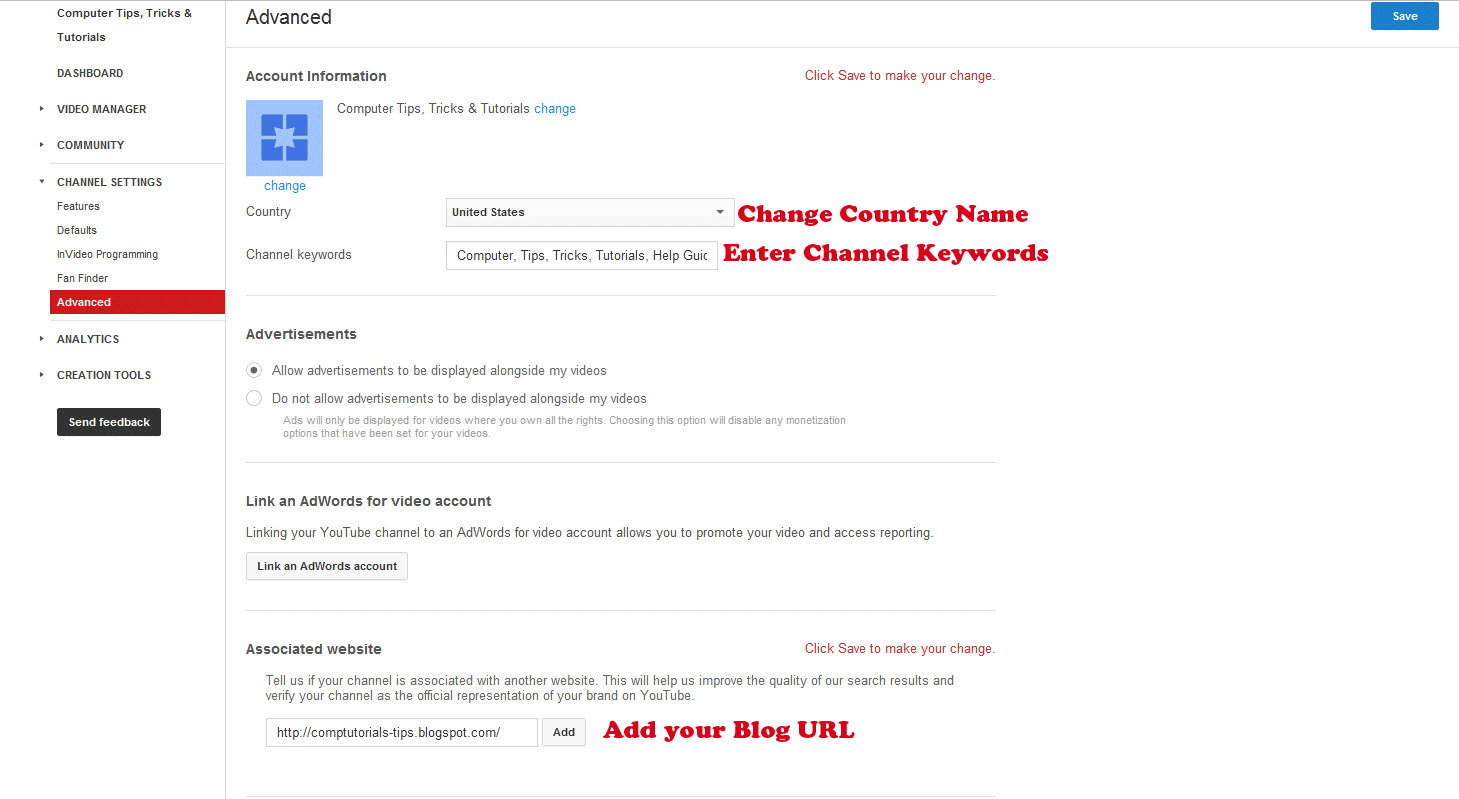
1:- Go to Channel Settings > Advance
2:- Change Country name to United States
3:- Enter your Blog Url
4:- Click Save
get google adsense account from youtube monetization program

5:- Go to Channel Settings and Click on "Enable" situated right with Monetization under features
youtube partnership monetization program

When you click on Enable you will be advance to another page where click on "Enable My Account"
You will be redirect to a wizard from where you have to select a new google adsense account and fill up your form. After submitting your application wait for 24 hours. After 24 hours sign in to google adsense account you will be signed in means that you have got your adsense account in 24 hours.

Read More: Monetize videos on youtube to Earn Money

Now keep uploading interesting watch able videos until you got minimum 5 dollar. Meanwhile keep updating your blog and when you think you are on an earning track from youtube and getting reasonable traffic on your blog than apply through your blog and use same adsense account. you will get approved for showing ads on your blog. now post ads on your blog. If you don't know about how to post ads on your blog

Read this: Showing Ads on you Websites or Blog

If you got any problem or confusion and want any kind of help about adsense do not hesitate to comment. I will help you as much as I can. Don't forget to share my post with your friends. Thanx


Read More

Sunday, February 9, 2014

How to Earn Money Online?

how to earn money online
How to Earn Money Online?

Earn Money Online

How to Earn Money Online? Thats a million dollars question raised in every person mind who want to earn money  without any investment. Now a days finding jobs or establishing business in real life become very difficult but in the virtual world of internet there are many different ways to earn online money. This is a specific tutorial course about earn money online. In this cource we will discuss the answer of How to Earn Money Online? And in the upcoming posts i  will present to you detailed tutorials of earn money online but now let me introduce to you the best platforms to earn money on internet without any investments.
earn money online

1: Google Adsense

On top of this list I suggest Google Adsense because Google Adsense is a best and easy  to learn platform about earning money online. You can earn money from Google Adsense by two different ways

We will discuss about Google Adsense in details in upcoming posts where i will bring complete Google Adsense Tutorials.

2: Paid to Click Websites:

There are thousands of Paid to Click (PTC) websites on internet that allows you to earn money online with viewing ads and by completing mini jobs, surveys and Tasks. You can search for PTC sites on google but beware there are many fake PTC sites are fooling people on internet thats why i recommend best 2 PTC websites that are very famous and loyal to their members.
(i)                  Neobux
(ii)                Clixsense

In the upcoming posts i will present detailed tutorial about earning money from these best paying PTC sites. After reading those post you will be able to earn a very reasonable ammount by working online.

3: By Selling Internet Traffic:

This is also a very good way to earn some extra bucks but to earn with these method you need some platforms like a good blog with reasonable traffic, facebook page, twitter account with alot of followers or a youtube channel with alot of views daily. In this method you sell your internet traffic to other webs and charged from them. I recommend two websites
(i)                  Adf.ly
Adf.ly is basically a link shortner service that provides you service to shorten your link. Once you shortened a link via Adf.ly you will get a short link. When you share that link on your platform like facebook page people visit that page and they will shown an ad first than your link destination url. And they pays you for every visit.
(ii)                ImgDino
ImgDino is a picture hosting service where you can upload your immages and they will give you the link of your immage, whenever some one open that link they will shown an ad and than your picture. This is a smart place to earn online money.


Do subscribe to my website for upcoming easy to learn tutorials about adsense, PTC and Selling Internet Traffic. Thanx to you all for visiting my post
Read More

Friday, February 7, 2014

Learn General Keyboard Shortcuts

Now a days, time has become very short. Everyone busy working and want to finish work in lesser time. While working on computer, you have to use both mouse, and keyboard for working. This consumes alot of time when working on keyboard, suddenly you have to hold mouse and do work. In this topic i will tell you about some keyboard shortcuts, so that you won’t need to hold mouse for performing some easy functions. Use them directly from Your keyboard.
learn general keyboard shorcuts
Simple Keyboard Shortcuts
  1. Ctrl+A: It will Select All the files in a folder or all the text in file.
  2. Ctrl+C or Ctrl+Insert: Can copy text, or files.
  3. Ctrl+V or Shift+Insert: Can paste the files or text you copied.
  4. Ctrl+Z: Can undo any mistake you done.
  5. Ctrl+Y: Can redo something that you remove something.
  6. Del Or Shift+Del: If you wish to delete some file/files, you can press delete file, this will move the file to recycle bin, you can restore it later. But if you want to remove it permanently, then just press Shift+Del.
  7. Ctrl+F: Can open find program anywhere, i.e Browsers or My Computer to find something.
  8. Alt+Tab or Alt+Esc: Can toggle between the tabs or folders or files you have opened. . In addition to it, If you add Shift key with this combination, this will work in backward way. Lets say If Alt+Tab toggles the next tab, then Alt+Shift+Tab will toggles the previous tab.
  9. Ctrl+Tab: Can toggle between the tabs open within a file, or a browser. In addition to it, If you add Shift key with this combination, this will work in backward way. Lets say If Ctrl+Tab toggles the next tab, then Ctrl+Shift+Tab will toggles the previous tab.
  10. Ctrl+Alt+Del: This will open Task Manager Program.
  11. Space+Backspace: This will delete the whole word you last written instead of deleted letters by letters.
  12. Ctrl+S: it will save anything you were writing or doing some editing. Its a quick saving method.
  13. Ctrl+Home: This will move the cursor to beginning.
  14. Ctrl+End: This will move the Cursor to the End.
  15. Ctrl+P: This will show you the print preview of the page.
  16. Prt screen: This will take the snapshot of the windows you opened. You can save this snapshot in image file using Paint. Just press Ctrl+C, and save it.


Click Here
Read More